
Suzuki GSX-R 1000 Service Manual: Drive mode selector inspection
Inspect the drive mode selector in the following procedures:
- set up the sds tool. (Refer to the sds operation manual for further details.)
- Turn the ignition switch on.
- Click “data monitor”.
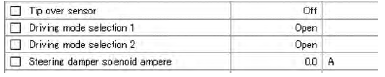
- Make sure each of “driving mode selection” on the monitor is indicated “open”.
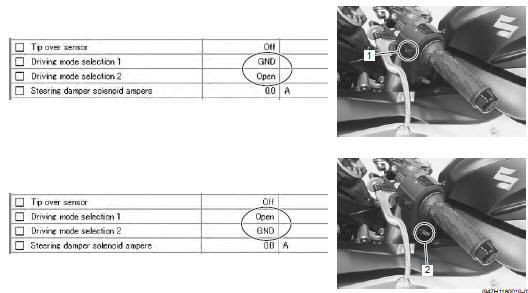
- Push each of drive mode selector (1) and (2). At this time, if the indication is changed to “gnd”, the function is normal.
 Ignition switch removal and installation
Removal
Remove the air cleaner box. Refer to “air cleaner box removal and
installation” in section 1d .
Disconnect the ignition switch lead wire coupler (1).
Disconnect the immo ...
 Specifications
Service data
Electrical
unit: mm (in)
Tightening torque specifications
Reference: for the tightening torque of fastener not specified in this
section, refer to “tightening torque list” i ...
Other materials:
Specifications
Service data
Wattage
unit: w
Tightening torque specifications
Note
the specified tightening torque is described in the following.
“Rear lighting system construction” “license plate light
components” “reflex reflector construction”
Reference: for the ...
Brake fluid replacement
Caution
handle brake fluid with care: the fluid reacts
chemically with paint, plastic, rubber
materials, etc.
Front brake
Place the motorcycle on a level surface and keep the
handlebars straight.
Remove the brake fluid reservoir cap and
diaphragm.
Suck u ...
Engine top side assembly
Assemble the engine top side in the reverse order of
disassembly. Pay attention to the following points:
Cylinder head
Install the dowel pins and a new cylinder head gasket
(1) to the cylinder.
Caution
use a new gasket to prevent gas leakage.
Place the cylinder head ...